
What Modem Do You Need for nbn®?
By: Yomojo Team
Last Updated: 26 Mar 2026

What Modem Do You Need for nbn® in Australia? A Complete Guide by Connection Type
Choosing the right modem for the National Broadband Network in Australia depends on the type of nbn® technology installed at your address. Not all nbn® connections use the same infrastructure, and the hardware requirements can vary significantly.
In simple terms, the modem you need is determined by how the internet signal reaches your premises. Some connections require a modem-router, while others require only a router because a Network Termination Device is already installed.
Do You Need a Modem for nbn®?
If you are setting up nbn® in Australia, one of the first questions you may have is whether you actually need a modem. The answer depends entirely on how your property is connected to the nbn® network.
Not all nbn® services use the same technology. Some connection types include an nbn®-supplied device that already performs the function of a modem. In those cases, you only need a router to distribute the internet throughout your home. Other connection types, particularly those that use older copper phone lines, require a modem-router that supports VDSL2.
The modem requirement depends on your nbn® connection type.
Here is a simple breakdown to help you understand what equipment is required for each major nbn® technology.
Fibre to the Node (FTTN) and Fibre to the Building (FTTB)
These connections rely on the copper line for the final stretch, so you need a modem-router that supports VDSL2. Without this, your service may not work correctly, and in some cases, nbn® may block incompatible devices from connecting
Fibre to the Premises (FTTP), Fibre to the Curb (FTTC), and Hybrid Fibre Coaxial (HFC)
These technologies come with an nbn®-supplied Network Termination Device (NTD). In these cases, you only need a router with a WAN or Internet port to distribute the connection to your home.
Fixed Wireless and Satellite
These also include an nbn®-supplied device, so a router is sufficient.
Modern devices often combine modem and router functions, but it is important to check compatibility before purchasing. If you are on higher-speed tiers such as nbn® 250 or nbn® 1000, make sure your equipment supports gigabit speeds and modern Wi-Fi standards like Wi-Fi 6 to avoid bottlenecks.
How to Check Your nbn® Connection Type
Before you can choose the right modem or router, you need to know which nbn® technology is connected to your home. The simplest way to check is by using the official nbn® address checker. By entering your home address, the tool will tell you whether you are connected via Fibre to the Node (FTTN), Fibre to the Premises (FTTP), Fibre to the Curb (FTTC), Hybrid Fibre Coaxial (HFC), or Fixed Wireless.
This information is important because each technology requires different equipment. Once you have used the address checker, you can check the nbn® technology type to confirm exactly what equipment is needed for your setup.
Note 💬
By identifying your connection type first, you avoid buying the wrong device and ensure your internet runs at the speed and stability your plan promises.
What Features Should an nbn® Modem Have?
When choosing an nbn® modem-router, it is not just about getting online. While compatibility is essential, the right features will determine how stable, fast, and reliable your connection is for everyday use. From streaming and gaming to video calls and remote work, your equipment plays a major role in overall performance.
In Australia, many households have multiple users and connected devices operating at the same time. Selecting a modem-router with modern capabilities ensures your network can handle this demand efficiently and consistently.
Below is a practical guide to the key features you should look for when selecting equipment for your nbn® service.
VDSL2 Compatibility
If you are connected via Fibre to the Node (FTTN) or Fibre to the Building (FTTB), you need a modem that supports VDSL2. This is the technology used to deliver nbn® services over copper phone lines for these connection types, as outlined by nbn® Co.
Without VDSL2 support, your modem will not connect. It should meet nbn® UNI-DSL requirements to ensure stable performance and consistent speeds.
Tip 💡
Before buying, confirm compatibility with your provider or manufacturer to avoid activation issues and ensure reliable internet from day one.
Gigabit Ethernet Ports
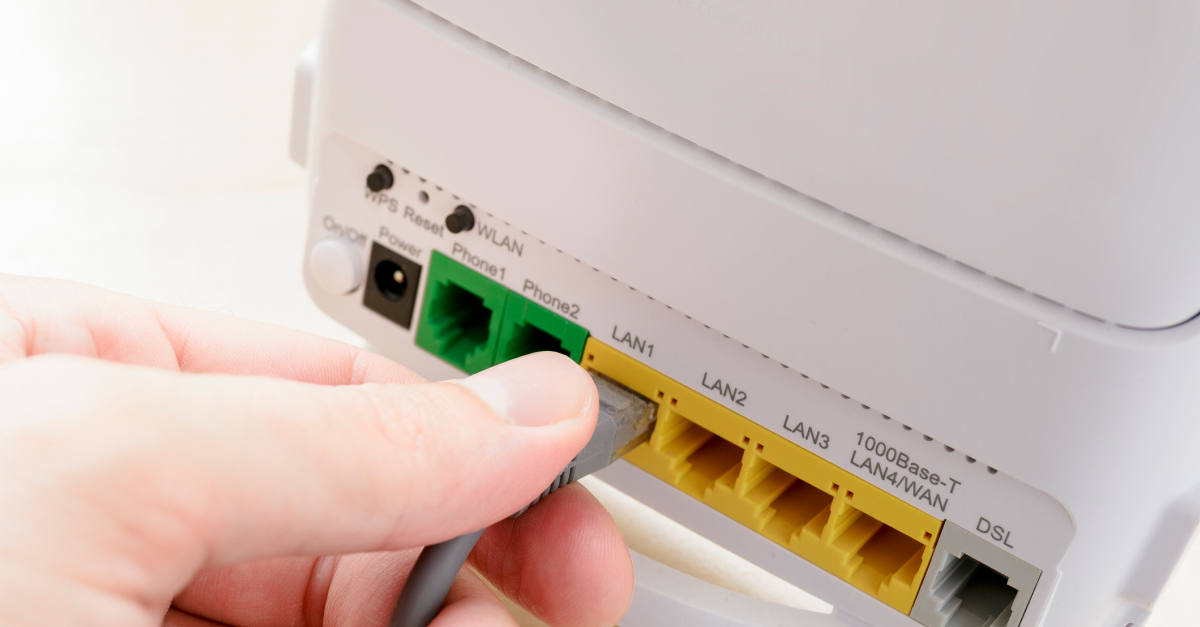
A quality nbn® modem should include multiple Gigabit Ethernet ports, particularly if you want to make the most of higher-speed plans such as nbn® 100+. Gigabit-capable hardware prevents your wired devices from becoming bottlenecked, ensuring you can take full advantage of higher nbn® speed tiers.
Wired Ethernet connections are also more consistent than Wi-Fi, making them ideal for gaming consoles, smart TVs, desktop PCs, or network-attached storage.
Note 💬
A router or modem with Gigabit ports can better handle fast data transfers, reduce latency, and avoid speed limitations that older 100 Mbps Ethernet hardware would impose.
Multi-Gigabit WAN/LAN Support (For nbn® 2Gbps Plans)
With the official launch of nbn® 2Gbps speed tiers, households now need hardware that goes beyond standard gigabit capabilities. Many older routers and modem-routers include 1Gbps WAN ports, which will limit speeds on plans above this level.
To take full advantage of nbn® 2Gbps, choose a modem or router that includes 2.5Gbps or faster WAN and LAN ports, along with internal processing powerful enough to handle multi-gigabit throughput. This is particularly important for busy households, gamers, streamers, or anyone who relies heavily on fast and consistent network performance.
Note 💬
Modern multi-gigabit hardware helps ensure your network can deliver the full speed your plan offers and prevents bottlenecks throughout your home.
Dual-Band or Wi-Fi 6
Modern households benefit greatly from dual-band Wi-Fi or, ideally, Wi-Fi 6. Wi-Fi 6 improves performance by increasing throughput, reducing congestion, and maintaining stronger performance when multiple devices are connected. It offers higher speeds and better performance compared to older standards, making it ideal for homes with many smart devices, heavy streaming, or online gaming.
Note 💬
Wi-Fi 6 routers are also backwards compatible, so older devices can still connect while newer ones take advantage of the increased capability.
Mesh Wi-Fi Support
If you live in a larger home or experience Wi-Fi dead zones, choosing a modem that works with mesh systems can make a huge difference. Mesh Wi-Fi uses multiple nodes placed around your home to create a seamless and consistent wireless network, eliminating weak spots. This is particularly helpful in multi-storey homes or apartments with thick walls.
Note 💬
Mesh systems ensure smooth roaming from room to room and are often easier to set up than traditional extenders. Modern mesh setups frequently support Wi-Fi 6 for improved performance across all nodes.
QoS and Band Steering
QoS (Quality of Service)
This lets your router prioritize certain types of traffic, like video calls, streaming, or online gaming, so they get enough bandwidth even when your network is busy.
Tip 💡
You can set a high priority for your work laptop, gaming console, or streaming device to avoid lag or buffering.
Band Steering:
Automatically guides devices to the best Wi-Fi band, usually moving them from the crowded 2.4 GHz band to the faster 5 GHz band. This reduces interference and improves speed, especially for high-demand activities.
Tip 💡
Place your router centrally and let band steering handle devices automatically for the strongest, most reliable connection.
Can You Use Your Own Modem with Yomojo?
If you're thinking about signing up with Yomojo, you might be wondering if you can use your own modem instead of renting or buying one from the provider. The short answer is yes. Yomojo allows you to Bring Your Own (BYO) modem, but there are a few important points to keep in mind.
Pros
You can choose a modem that suits your budget, home size, and performance needs.
Gives you full control over network settings, parental controls, and security options.
Saves money if you already own a suitable nbn®-compatible modem.
Allows you to upgrade to newer Wi-Fi standards, such as Wi-Fi 6 or multi-gigabit hardware.
You can avoid being locked into ISP-supplied hardware or rental fees.
Cons
Not all modems are compatible with the nbn® technologies like FTTN, FTTP, or HFC.
If the modem is not configured correctly, you may experience slower speeds or dropouts.
Yomojo support may be limited if issues are caused by your own hardware.
BYO devices often require manual setup, which can be daunting for some users.
Older or low-spec models may not support higher nbn® speed tiers.
For a list of modems that work with Yomojo, check out Yomojo-compatible modems.
Tip 💡
Before buying a modem, double-check that it meets Yomojo's requirements for your nbn® type. This will help avoid any headaches and ensure your internet runs as smoothly as possible.
Yomojo nbn® Modems: Compatibility & Performance
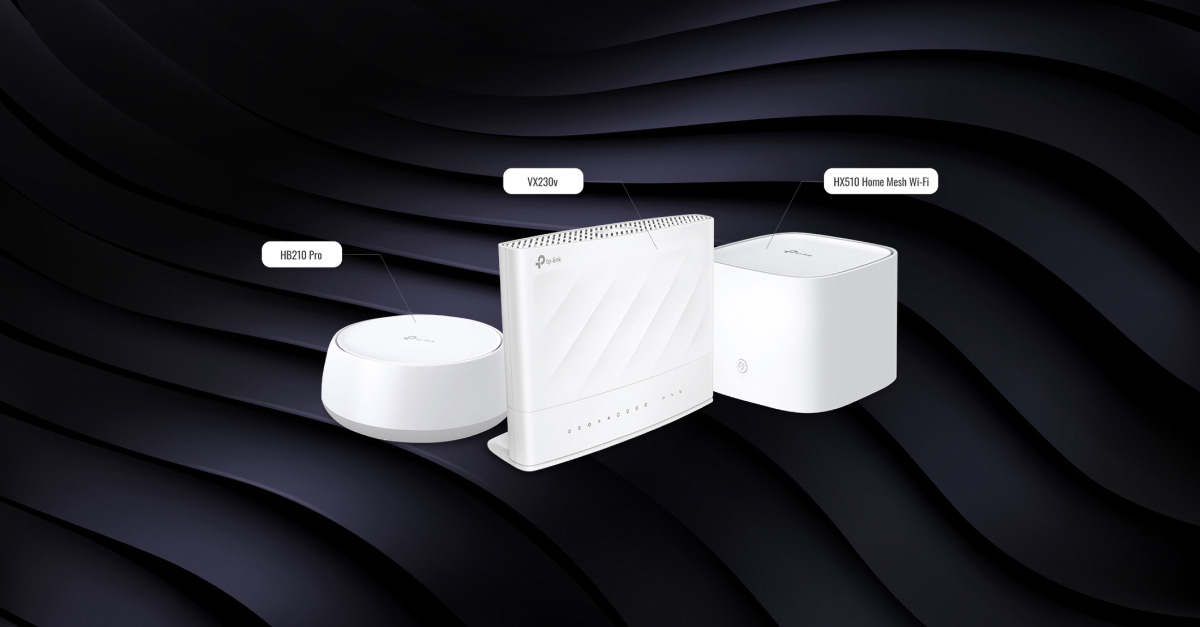
The Yomojo nbn® modem range provides devices designed to work with all major nbn® connection types across Australia. Choosing a modem that matches your nbn® technology, such as FTTP, FTTN, or HFC, ensures stable speeds and reliable connectivity.
Modern Yomojo modems support dual-band Wi-Fi, helping multiple devices connect and operate smoothly. Features like Quality of Service (QoS) can prioritise bandwidth for streaming or gaming, while simple setup guides make installation straightforward for any household.
When selecting a modem, consider your connection type, number of devices, and internet usage. Yomojo modems combine compatibility, performance, and ease of use, making them a reliable choice for Australian homes.
Why Customers Trust Yomojo for nbn®
Australians can trust Yomojo for nbn® because of its strong reputation and consistently positive customer experiences. On ProductReview.com.au, the company holds a 4.7/5-star rating, reflecting satisfaction with its reliable service, friendly support, and simple, flexible plans. Customers frequently highlight Yomojo's transparent pricing, responsive assistance, and good value for money, which build confidence in choosing its nbn® offerings. Supported by established network partnerships, Yomojo reassures users that its connectivity is solid and dependable, making it a provider Australians feel comfortable recommending
Common nbn® Modem Mistakes to Avoid
Setting up your nbn® modem correctly can significantly improve your internet experience. Here are some common mistakes to watch out for:
Poor modem placement
Placing your modem behind furniture, in a cupboard, or near appliances can cause interference.
Position your modem centrally in a clear, open space to maximise Wi-Fi coverage and reduce dead zones.
Using incompatible or outdated hardware
Different nbn® connection types, such as FTTN, FTTP, or HFC, require specific modem features like VDSL2 support or a suitable WAN port.
Older modems may struggle to deliver expected speeds or remain stable.
Loose or damaged cables
Ethernet and power cables that are not securely connected or are of poor quality can cause drop-outs and slow performance.
Check cables regularly to prevent connectivity issues.
Not testing your connection
After installation, failing to run a speed test or check modem lights can leave problems unnoticed.
Testing early allows you to adjust your setup or contact your provider before frustration builds.
nbn® Modem Setup Overview
Setting up your nbn® modem correctly is essential to get the most out of your internet connection. Here is an overview of the typical steps involved in the process:


Tip 💡
For the best Wi-Fi coverage, place your modem in a central, elevated location away from walls and electronic devices that may cause interference
Do nbn® Speeds Depend on Your Modem?
Many people assume that their internet speed is solely determined by their nbn® plan, but the modem you use can also have a significant impact. While your plan sets the maximum line speed available, your modem influences how efficiently that speed is delivered to your devices.
Line Speed vs Wi-Fi Performance
Line speed refers to the maximum speed provided by your nbn® plan, whereas Wi-Fi performance determines how much of that speed reaches your devices. Older or lower-quality modems may struggle to deliver the full line speed, particularly when multiple devices are connected simultaneously or when streaming high-definition content.
Note 💬
To ensure your modem supports your plan's capabilities, it is important to choose one that is compatible with your nbn® connection type and capable of handling higher speeds. Visit nbn® speed tier for guidance on selecting a plan that matches your household needs.
Choosing the Right nbn® Modem for Your Yomojo Plan
Selecting the right modem is a key step to getting the best performance from your Yomojo nbn® plan. A compatible modem ensures you can fully utilise your chosen plan's speed, maintain a stable connection across your household and avoid frustrating drop-outs. Consider your household size, number of devices, and typical internet use when choosing between a standard modem, a high-speed router, or a mesh Wi-Fi system.
For Australians looking to get started, explore the Yomojo nbn® plans to find the option that fits your needs. Once you've picked up a plan, check out our list of compatible Yomojo modems to ensure your setup delivers the best possible experience.